Saturday, May 14, 2016

Configuring WSO2 ESB with WebLogic Server Using JMS


This article gives the configuration details and the proxy service sample to connect the ESB as a JMS consumer and producer with WeblLogic Message Queue. Here the provided sample is tested with WSO2 ESB 4.9.0, WebLogic 12.1.3, JDK 1.8 and Ubuntu 14.04. At the end of this article mentioned about the other combinations of version, where this integration tested.

Setting up the WebLogic Server


Here used Weblogic 12.1.3. This can be downloaded from the below link.

Installation of Weblogic Server 12.1.3

 
After downloading the generic installer ( Installers with Oracle WebLogic Server and Oracle Coherence ) will get a jar named – fmw_12.1.3.0.0_wls.jar. Copy that to a specific folder and create another folder inside as weblogic_home to give it as a location for the installation during the installation step. Then using the terminal execute the below command.

java -jar fmw_12.1.3.0.0_wls.jar

Follow the screens, based on the instructions. The screen shots of each screen given below:


After the installation, if the configuration wizard not loaded, go to /weblogic_home/oracle_common/common and run the config.sh. Then will get the below screens and proceed with it.


 After completing the configuration, now can start the WebLogic Server 12.1.3.

Go to /home/ajanthan/wso2/weblogic_server5/weblogic_home/user_projects/domains/base_domain and start using startWebLogic.sh.

After a successful start the terminal will be look as below:


 Configuring Message Queue in WebLogic


Go to the URL http://ajanthan-thinkpad-t440p:7001/console


Follow the below steps to create the JMSServer, ConnectionFactory and Message Queue in WebLogic server.

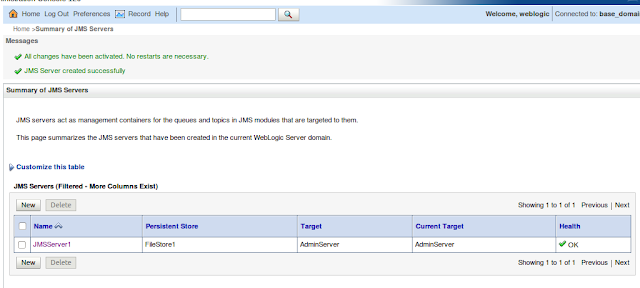
Go to Domain Structure → base_domain → Services → Messaging → JMS Servers
Create New JMSServer.


Create a New Store and set a folder for file store location. Here it is filestorewso2 and then proceed with the below screens.


Now to configure JMS Queue and the Connection Factory, 
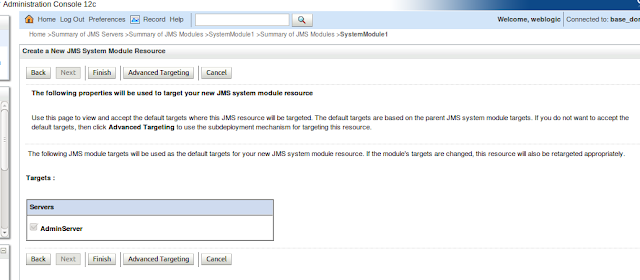
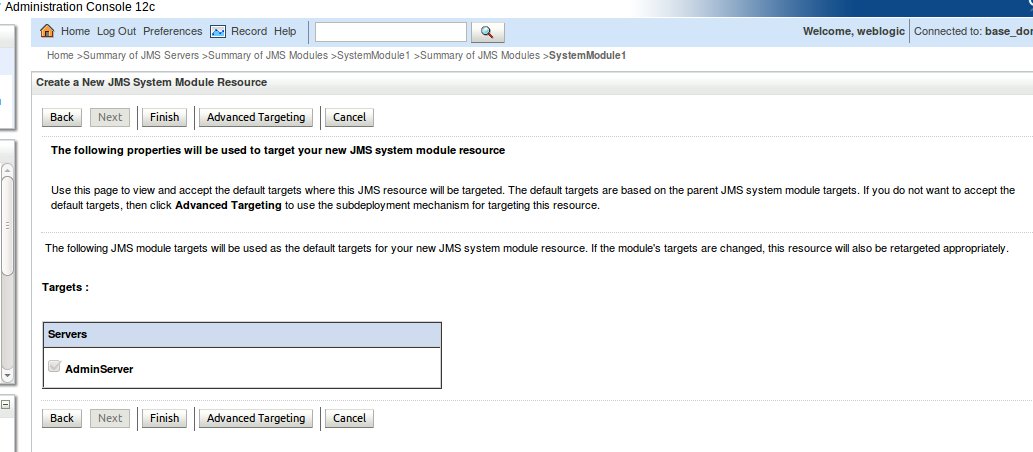
Go to Domain Structure → base_domain → Services → Messaging → JMS Modules and create a new module and follow the screens below.


Then Select the created JMS Module, here it is SystemModule1 and select the tab Subdeployments.Then follow the below screens.


Select the Module created ( SystemModule1 ) and follow the screens to create the connection factory.


Same way create the queue. Follow the screens as below:


That's it, the WebLogic based configurations done.

Configuring WSO2 ESB 4.9.0


As a first step, need to create the client jar of WebLogic server to support the WSO2 ESB.

Go to /home/ajanthan/wso2/weblogic_server5/weblogic_home/wlserver/server/lib
and run the below command.

java -jar wljarbuilder.jar

This will create a wlfullclient.jar inside the same location. Now need to remove the javax.jms package and javax.xml.namespace package from the wlfullclient.jar.
For this you can follow two options.

1)  Use the pom.xml in the https://docs.wso2.com/display/ESB490/Configure+with+WebLogic and build the bundle and copied it to ESB_HOME/repository/components/dropins.

2) Open the wlfullclient.jar using Archive Manager and remove the folders of the below packages manually. 
javax.jms
javax.xml.namespace
And copy the jar to ESB_HOME/repository/components/lib.

JMS Listener configuration in axis2.xml


<transportReceiver name="jms" class="org.apache.axis2.transport.jms.JMSListener">
        <parameter name="myQueueConnectionFactory" locked="false">
        <parameter name="java.naming.factory.initial" locked="false">weblogic.jndi.WLInitialContextFactory</parameter>
        <parameter name="java.naming.provider.url" locked="false">t3://localhost:7001</parameter>
        <parameter name="transport.jms.ConnectionFactoryJNDIName" locked="false">jms/TestConnectionFactory1</parameter>
        <parameter name="transport.jms.ConnectionFactoryType" locked="false">queue</parameter>
        <parameter name="transport.jms.UserName" locked="false">weblogic</parameter>
        <parameter name="transport.jms.Password" locked="false">Batticaloa@1A</parameter>
        </parameter>

        <parameter name="default" locked="false">
        <parameter name="java.naming.factory.initial" locked="false">weblogic.jndi.WLInitialContextFactory</parameter>
        <parameter name="java.naming.provider.url" locked="false">t3://localhost:7001</parameter>
        <parameter name="transport.jms.ConnectionFactoryJNDIName" locked="false">jms/TestConnectionFactory1</parameter>
        <parameter name="transport.jms.ConnectionFactoryType" locked="false">queue</parameter>
        <parameter name="transport.jms.UserName" locked="false">weblogic</parameter>
        <parameter name="transport.jms.Password" locked="false">Batticaloa@1A</parameter>
        </parameter>
</transportReceiver>

JMS Sender configuration


<transportSender name="jms" class="org.apache.axis2.transport.jms.JMSSender"/>

Consumer Proxy Service

<?xml version="1.0" encoding="UTF-8"?>
<proxy xmlns="http://ws.apache.org/ns/synapse"
       name="WeblogicJMSConsumerProxy"
       transports="jms"
       statistics="disable"
       trace="disable"
       startOnLoad="true">
   <target>
      <inSequence>
         <log level="custom">
            <property name="STATUS:"
                      value="------Message consumed by WeblogicJMSConsumerProxy--------"/>
         </log>
         <log level="full"/>
      </inSequence>
      <outSequence>
         <send/>
      </outSequence>
   </target>
   <parameter name="transport.jms.Destination">jms/TestJMSQueue1</parameter>
   <description/>
</proxy>

Producer Proxy Service

<?xml version="1.0" encoding="UTF-8"?>
<proxy xmlns="http://ws.apache.org/ns/synapse"
       name="WeblogicJMSSenderProxy"
       transports="http"
       statistics="disable"
       trace="disable"
       startOnLoad="true">
   <target>
      <inSequence>
         <property name="Accept-Encoding" scope="transport" action="remove"/>
         <property name="Content-Length" scope="transport" action="remove"/>
         <property name="Content-Type" scope="transport" action="remove"/>
         <property name="User-Agent" scope="transport" action="remove"/>
         <log level="custom">
            <property name="STATUS:"
                      value="------Message Sent by WeblogicJMSConsumerProxy--------"/>
         </log>
         <property name="OUT_ONLY" value="true"/>
         <property name="FORCE_SC_ACCEPTED" value="true" scope="axis2"/>
         <send>
            <endpoint>
               <address uri="jms:/jms/TestJMSQueue1?transport.jms.ConnectionFactoryJNDIName=jms/TestConnectionFactory1&java.naming.factory.initial=weblogic.jndi.WLInitialContextFactory&java.naming.provider.url=t3://localhost:7001&transport.jms.DestinationType=queue"/>
            </endpoint>
         </send>
      </inSequence>
      <outSequence>
         <send/>
      </outSequence>
   </target>
   <description/>
</proxy>

Test Results

Tested Environment Combinations


1) ESB 4.7.0 / JDK1.7 / Weblogic 10.3.6 - Weblogic 11g.
2) ESB 4.9.0 / JDK1.7 / Weblogic 10.3.6 - Weblogic 11g.
3) ESB 4.9.0 / JDK1.8 / Weblogic 12.1.3

References


[1] https://docs.wso2.com/display/ESB490/Configure+with+WebLogic
[2] https://blogs.oracle.com/soaproactive/entry/how_to_create_a_simple
[3] http://lasanthatechlog.blogspot.com/2013/06/integrating-wso2-esb-with-weblogic-as.html
[4] https://docs.oracle.com/cd/E12840_01/wls/docs103/client/jarbuilder.html


Friday, February 19, 2016

Separating Logs in WSO2 ESB Proxy Services ( SynapseObserver ) and API's

This article gives a solution for a common issue faced during logging in WSO2 ESB. Currently in wso2carbon.log, all the service related logs will be printed in one file. For some use cases we may need to differentiate log files to each service. Based on current implementation of ESB, only proxy services can be logged using SynapseObserver option and to differentiate the API's we need to use log4j.properties.


1) Using SynapseObserver to log proxy service logs to separate file


Create a CustomSynapseObserver.java class by extending the AbstractSynapseObserver.java.
package com.custom.synapseobserver;

import java.io.IOException;

import org.apache.commons.logging.Log;
import org.apache.commons.logging.LogFactory;
import org.apache.log4j.DailyRollingFileAppender;
import org.apache.log4j.Level;
import org.apache.log4j.Logger;
import org.apache.log4j.PatternLayout;
import org.apache.synapse.Mediator;
import org.apache.synapse.config.AbstractSynapseObserver;
import org.apache.synapse.core.axis2.ProxyService;
import org.apache.synapse.mediators.base.SequenceMediator;

public class CustomSynapseObserver extends AbstractSynapseObserver {

 private static final Log log = LogFactory
   .getLog(CustomSynapseObserver.class);

 public void proxyServiceAdded(ProxyService proxy) {
  try {
   log.info("-------------------- Custom Observer: Added Proxy Invoked---------------------------");
   addToLog(proxy.getName());
  } catch (IOException e) {
   log.error(
     "CustomProxyObserver could not set service level logger for the proxy : "
       + proxy.getName(), e);
  }
 }

 private void addToLog(String name) throws IOException {

  String filename = "logs/" + name + ".log";
  String datePattern = "yyyy-MM-dd";
  String SYSTEM_LOG_PATTERN = "[%d] %5p - %x %m {%c}%n";

  PatternLayout layout = new PatternLayout(SYSTEM_LOG_PATTERN);
  DailyRollingFileAppender appender = null;
  appender = new DailyRollingFileAppender(layout, filename, datePattern);
  Logger proxyLogger = Logger.getLogger("SERVICE_LOGGER." + name);
  proxyLogger.setLevel(Level.ALL);
  proxyLogger.setAdditivity(false);
  proxyLogger.addAppender(appender);

 }

}
Use the below pom.xml and create a maven project and build the jar.

 4.0.0
 com.custom.synapseobserver
 CustomSynapseObserver
 0.0.1
 CustomSynapseObserver
 CustomSynapseObserver


   org.apache.synapse
   synapse-core
   2.1.3-wso2v11
  
  
   commons-logging
   commons-logging
   1.1.1


    true
    daily
    ignore
   
   wso2-nexus
   http://maven.wso2.org/nexus/content/groups/wso2-public/


    true
    daily
    ignore
   
   wso2-nexus
   http://maven.wso2.org/nexus/content/groups/wso2-public/


Copy the jar into ESB_HOME/repository/compoenents/lib.

To define the CustomSynapseObserver, open the ESB_HOME/repository/conf/synapse.properties file and add the following line:

synapse.observers=com.custom.synapseobserver.CustomSynapseObserver

Now restart the server and the custom synapse observer is ready to use.


2) Using log4j.properties to log API service logs to separate file


To log the API's we need to go with log4j.properties. Here the API_LOGGER implementation helps us to seperate each API logs into a file. Below is the sample configuration we can set in log4j.properties. But in this case, there is a concern that the API names to be identified early and need to configure it in the lg4j.properties.

log4j.logger.API_LOGGER = DEBUG, API
log4j.logger.API_LOGGER.test1API=DEBUG, TestAPI1
log4j.logger.API_LOGGER.test2API=DEBUG, TestAPI2

log4j.appender.API=org.apache.log4j.DailyRollingFileAppender
log4j.appender.API.Append = true
log4j.appender.API.File=${carbon.home}/repository/logs/api.log
log4j.appender.API.layout=org.apache.log4j.PatternLayout
log4j.appender.API.layout.ConversionPattern=TID: [%d] %5p {%c} - %x %m {%c}%n

log4j.appender.TestAPI1=org.apache.log4j.DailyRollingFileAppender
log4j.appender.TestAPI1.Append = true
log4j.appender.TestAPI1.File=${carbon.home}/repository/logs/test1API.log
log4j.appender.TestAPI1.layout=org.apache.log4j.PatternLayout
log4j.appender.TestAPI1.layout.ConversionPattern=TID: [%d] %5p {%c} - %x %m {%c}%n

log4j.appender.TestAPI2=org.apache.log4j.DailyRollingFileAppender
log4j.appender.TestAPI2.Append = true
log4j.appender.TestAPI2.File=${carbon.home}/repository/logs/test2API.log
log4j.appender.TestAPI2.layout=org.apache.log4j.PatternLayout
log4j.appender.TestAPI2.layout.ConversionPattern=TID: [%d] %5p {%c} - %x %m {%c}%n

References


[1] https://docs.wso2.com/display/ESB490/Sample+651%3A+Using+Synapse+Observers
[2] http://synapse.apache.org/Synapse_Extending.html
[3] http://dakshithar.blogspot.com/2012/03/logging-with-wso2-esb.html

Friday, December 25, 2015

Sending POST Requests to WSO2 ESB Proxy Service without Body

This article shows how to send a Request without body to a ESB proxy service. When we send a post request to ESB without body and any content aware mediators in the way then the Send Timeout error will be thrown in the ESB carbon log. This can be reproduced using a log mediator in the synapse configuration. To overcome this issue need to set the below property in synapse configuration.

<property name="FORCE_POST_PUT_NOBODY" scope="axis2" type="BOOLEAN" value="true"/> 

Thursday, December 24, 2015

Differentiating the Admin/API/Proxy/Main Sequence service calls in WSO2 ESB at axis2 level

This article shows how to differentiate the Admin/API/ProxyMain sequence service calls using a axis2 handler. Here only giving a sample class to handle this requirement. To get more information on how to create module and handler refer [1], [2].
package com.custom.axis.loggers;

import org.apache.axis2.AxisFault;
import org.apache.axis2.context.MessageContext;
import org.apache.axis2.description.AxisService;
import org.apache.axis2.description.Parameter;
import org.apache.axis2.handlers.AbstractHandler;
import org.apache.commons.logging.Log;
import org.apache.commons.logging.LogFactory;
import org.apache.synapse.SynapseConstants;

/*
 * This class differentiate's the Proxy Service / API / Admin Service Calls.
 *
 */

public class CustomLoggingHandler extends AbstractHandler {

    private static final Log log = LogFactory
            .getLog(CustomLoggingHandler.class);

    public InvocationResponse invoke(MessageContext msgContext)
            throws AxisFault {

        log.debug("----------------------CustomLoggingHandler Invoked----------------------");

        AxisService axisService = msgContext.getAxisService();

        if (isProxyService(msgContext, axisService)) { // For Proxy Services checking the ServiceType Parameter
            if (log.isDebugEnabled()) {
                log.debug("Is a proxy service.");
            }
        } else { // For APIs/Main Sequence and Admin Services
            if (axisService.getAxisServiceGroup().getServiceGroupName()
                    .equals(SynapseConstants.SYNAPSE_SERVICE_NAME)) { //For APIs and main sequence
                if (log.isDebugEnabled()) {
                    log.debug("Is a API.");
                }
            } else { // For Admin Services
                if (log.isDebugEnabled()) {
                    log.debug("Is a Admin Service.");
                }
            }
        }

        return InvocationResponse.CONTINUE;
    }

    // Method to check whether request is for Proxy Service.
    public static boolean isProxyService(MessageContext messageContext,
            AxisService axisService) {

        if (axisService != null) {
            Parameter val = axisService.getParameter("serviceType");
            if (val != null
                    && val.getValue().toString().equalsIgnoreCase("Proxy")) {
                if (log.isDebugEnabled()) {
                    log.debug("Parameter Value Service Type: "
                            + val.getValue().toString());
                }
                return true;
            }
        }
        return false;
    }


[1] http://ajanthane.blogspot.com/2015/12/creating-axis2-module-for-custom.html
[2] http://ajanthane.blogspot.com/2015/10/creating-custom-axis2-handler.html

Creating Axis2 Module for Custom Logging and Integrating to WSO2 ESB

This article is about creating Axis2 module and Integrating it with WSO2 ESB.

1) Create a Maven Project using eclipse. And add the below to the dependencies in pom.xml.Below is the pom.xml created for this sample.

    4.0.0

    CustomAxis2ModuleProject
    CustomAxis2ModuleProject
    0.0.1-SNAPSHOT
    jar

    CustomAxis2ModuleProject
    http://maven.apache.org

    
        UTF-8


            junit
            junit
            3.8.1
            test
        
        
            org.apache.axis2.wso2
            axis2
            1.6.1.wso2v14
        
        
            org.apache.synapse
            synapse-core
            2.1.3-wso2v11
        
        
            commons-logging
            commons-logging
            1.1.1


                true
                daily
                ignore
            
            wso2-nexus
            http://maven.wso2.org/nexus/content/groups/wso2-public/


                true
                daily
                ignore
            
            wso2-nexus
            http://maven.wso2.org/nexus/content/groups/wso2-public/


2) Create the Axis2 Module Implementation.This can be done by creating a CustomLoggingModule class by implementing the Module class like below.
package com.custom.axis.loggers;

import org.apache.axis2.AxisFault;
import org.apache.axis2.context.ConfigurationContext;
import org.apache.axis2.description.AxisDescription;
import org.apache.axis2.description.AxisModule;
import org.apache.axis2.modules.Module;
import org.apache.commons.logging.Log;
import org.apache.commons.logging.LogFactory;
import org.apache.neethi.Assertion;
import org.apache.neethi.Policy;

public class CustomLoggingModule implements Module {

    private static final Log log = LogFactory.getLog(CustomLoggingModule.class);

    public void applyPolicy(Policy arg0, AxisDescription arg1) throws AxisFault {
        // TODO Auto-generated method stub

    }

    public boolean canSupportAssertion(Assertion arg0) {
        // TODO Auto-generated method stub
        return false;
    }

    public void engageNotify(AxisDescription arg0) throws AxisFault {
        // TODO Auto-generated method stub

    }

    public void init(ConfigurationContext arg0, AxisModule arg1)
            throws AxisFault {
        if (log.isDebugEnabled()) {
            log.debug("Custom Logging Module Init Method Invoked");
        }
    }

    public void shutdown(ConfigurationContext arg0) throws AxisFault {
        // TODO Auto-generated method stub

    }

}


3) Create the Handlers. This can be done by creating a CustomLoggingHandler class by extending AbstractHandler class.
package com.custom.axis.loggers;

import org.apache.axis2.AxisFault;
import org.apache.axis2.context.MessageContext;
import org.apache.axis2.handlers.AbstractHandler;
import org.apache.commons.logging.Log;
import org.apache.commons.logging.LogFactory;

/*
 * Custom Axis2 Handler for custom logging.
 *
 */

public class CustomLoggingHandler extends AbstractHandler {

    private static final Log log = LogFactory
            .getLog(CustomLoggingHandler.class);

    public InvocationResponse invoke(MessageContext msgContext)
            throws AxisFault {

        // Add your custom logging logic here

        return InvocationResponse.CONTINUE;
    }

}


4) Create a module.xml in src/main/resources/META-INF. The sample module.xml is below. Here only invoking the handler in the InFlow.

Note: Here due to auto formatting in the editor the <inFlow> is converted to <inflow>. Use <inFlow> when you try out the sample. 


5) The maven project structure will look like below.
 6) Build the project using Maven build.

7) Copy the jar created to  ESB_HOME/repository/deployment/server/axis2modules/ and rename with .mar extension.
8) Modify the axis2.xml to add the phase to the InFlow.
 9) To assign the module globally to all the service requests add the module to axis2.xml as below.
10) Now the custom module is ready to use.

References
[1] http://wso2.com/library/777/ 
[2] https://axis.apache.org/axis2/java/core/docs/modules.html
[3] https://axis.apache.org/axis2/java/core/docs/Axis2ArchitectureGuide.html#requirements